
Calva Multi-REPL
VSCode / Calva.
Introduction
Since version 2.0.543 Calva supports arbitrary many Clojure REPLs of whatever kind. I wanted to test this new Multi-REPL Calva functionality in a minimal setup, so I created this minimal Calva multi-repl demo. I did this demo for myself to experiment with the new Calva multi-repl functionality, but if some other developer finds this setup useful, I thought I might write a short blog post about it.
The short demo I explain in this blog post is in my Clojure Github repo in directory calva-multi-repl.
Calva Output to Terminal
In the following chapters I write that you can read the REPL output in the VSCode terminal. I have this setting in my VSCode settings.json:
    "calva.outputDestinations": {

        "evalResults": "terminal",
        "evalOutput": "terminal",
        "otherOutput": "terminal"
    },
Profile kari
I have various tools in my personal profile kari, ~/.clojure/deps.edn:
{:aliases {:kari {:extra-paths ["scratch"]
                  :extra-deps {; NOTE: hashp 0.2.1 sci print bug.
                               hashp/hashp {:mvn/version "0.2.2"}
                               org.clojars.abhinav/snitch {:mvn/version "0.1.16"}
                               com.gfredericks/debug-repl {:mvn/version "0.0.12"}
                               djblue/portal {:mvn/version "0.62.1"}}}

           :reveal {:extra-deps {vlaaad/reveal {:mvn/version "1.3.312"}}
                    :ns-default vlaaad.reveal
                    :exec-fn repl}

           :outdated {;; Note that it is `:deps`, not `:extra-deps`
                      :deps {com.github.liquidz/antq {:mvn/version "2.11.1276"}}
                      :main-opts ["-m" "antq.core"]}}}
I use this kari profile for testing that snitch works both in the backend and frontend code in this example. Remove the profile or use your own personal profile in file .user.edn.
Backend (Clojure) REPL
Open a terminal in this directory and run command:
bb backend-repl
It prints something like:
cmd:  [clojure -M:dev:backend:calva-external-repl:kari -i bb-scripts/backendinit.clj -m nrepl.cmdline --middleware "[cider.nrepl/cider-middleware]"]
nREPL server started on port 34423 on host localhost - nrepl://localhost:34423
In VSCode/Calva: Command Palette => Calva: Connect to Running REPL Server in the Project => Choose: deps.edn
=> This should print something like this in the Terminal window:
Latest available nREPL dependency versions found on Clojars:
  nrepl: 1.5.1
  cider-nrepl: 0.58.0
  cider/piggieback: 0.6.1
Please consider sponsoring Calva: https://calva.io/sponsors ♥️
Using host:port localhost:34423 ...
Hooking up nREPL sessions on port 34423...
Connected session: clj, port: 34423
Evaluating code from settings: 'calva.autoEvaluateCode.onConnect.clj'
NOTE: The port should be the same.
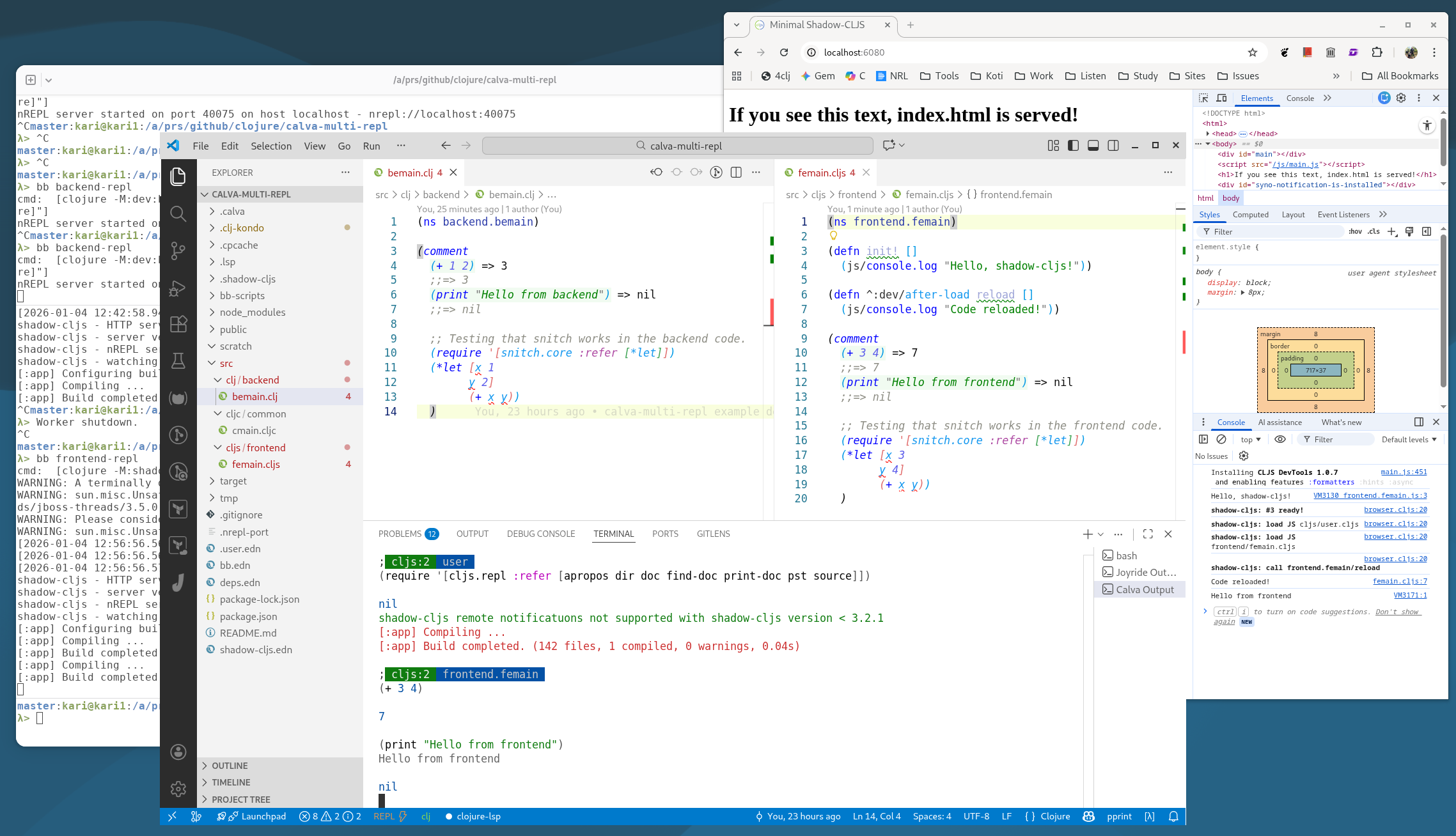
Open file bemain.clj in VSCode. Evaluate the S-expressions in the rich comment:
(comment
  (+ 1 2)
  ;;=> 3
  (print "Hello from backend")
  ;;=> nil
  )
You should see in the VSCode Terminal:
; clj  backend.bemain
(+ 1 2)
3
(print "Hello from backend")
Hello from backend
nil
Also try evaluating the snitch part of the file, and then evaluate the let bindings x and y => you should have the values printed in the VSCode terminal window.
You have now verified that your backend Clojure REPL is connected to Calva.
Frontend (Clojurescript) REPL
NOTE. Peter Strömberg (the creator of Calva) told me this in the Clojurians slack:
Generally it is better to start shadow-cljs watchers from a clojure started REPL, than from a npx shadow-cljs started one. This because using shadow-cljs you will start two separate JVM processes, and dev tooling like Snitch will not work as well as when there is only one JVM process from which the watchers and cljs repl is started. In Calva jack-in the former happens when using project type deps.edn + shadow-cljs and the latter with the shadow-cljs project type. There is some discussion about this here: https://blog.agical.se/en/posts/shadow-cljs-clojure-cljurescript-calva-nrepl-basics/
So, we are starting the shadow-cljs watchers from a Clojure started REPL in this demo (see file .user.edn).
Open a terminal in this directory and run command:
bb frontend-repl
It prints something like:
cmd:  [clojure -M:shadow-cljs:frontend:kari -m shadow.cljs.devtools.cli watch app]
...
shadow-cljs - HTTP server available at http://localhost:6080
shadow-cljs - server version: 3.3.4 running at http://localhost:9633
shadow-cljs - nREPL server started on port 36259
shadow-cljs - watching build :app
[:app] Configuring build.
[:app] Compiling ...
[:app] Build completed. (142 files, 0 compiled, 0 warnings, 1.25s)
Open browser in http://localhost:6080, you should see text: If you see this text, index.html is served!
Open browser developer tools panel / Console to see the Console output. You should see the (js/console.log "Hello, shadow-cljs!") in the femain.cljs:
Hello, shadow-cljs!
In VSCode/Calva: Command Palette => Calva: Connect to Running REPL Server in the Project => Choose: shadow-cljs => Select which build to connect to => Choose: :app
You should see something like this in the VSCode Terminal:
Connecting using "shadow-cljs" project type.
Connecting ...
Reading port file: file:///a/prs/github/clojure/calva-multi-repl/.shadow-cljs/nrepl.port ...
Using host:port localhost:36259 ...
Hooking up nREPL sessions on port 36259...
Connected session: clj:2, port: 36259
Evaluating code from settings: 'calva.autoEvaluateCode.onConnect.clj'
; clj:2  shadow.user
(when-let [requires (resolve 'clojure.main/repl-requires)] (clojure.core/apply clojure.core/require @requires))
nil
Creating cljs repl session...
Connecting cljs repl: shadow-cljs...
Connected shadow-cljs runtime: 3, Chrome 537.36 [Linux x86_64], host: browser
Connected session: cljs:2, repl: :app
Evaluating code from settings: 'calva.autoEvaluateCode.onConnect.cljs'
; cljs:2  user
(require '[cljs.repl :refer [apropos dir doc find-doc print-doc pst source]])
nil
shadow-cljs remote notificatuons not supported with shadow-cljs version < 3.2.1
NOTE: The port should be the same.
Open file femain.clj in VSCode. Evaluate the S-expressions in the rich comment:
(comment
  (+ 3 4)
  ;;=> 7
  (print "Hello from frontend")
  ;;=> nil
  )
You should see in the VSCode Terminal:
; cljs:2  frontend.femain
(+ 3 4)
7
(print "Hello from frontend")
Hello from frontend
nil
Check in the browser Developer tools panel, that you also see Hello from frontend in the Console output.
Also try evaluating the snitch part of the file, and then evaluate the let bindings x and y => you should have the values printed in the VSCode terminal window.
You have now verified that your frontend Clojurescript REPL is connected to Calva.
CLJC Files
Open file cmain.clj in VSCode.
Check that you see .cljc -> clj in the bottom bar new REPL icon. This means your cljc file will be evaluated in the backend Clojure REPL.
Evaluate the S-expressions in the rich comment:
(comment
  (+ 5 6)
  ;;=> 11
  (print "Hello from common")
  ;;=> nil
  )
You should see in the VSCode Terminal:
; clj  common.cmain
(+ 5 6)
11
(print "Hello from common")
Hello from common
nil
Next, click the .cljc -> clj text: Click to show REPL sessions menu => Choose cljs (frontend) REPL. Now you should see text cljs and :app in the bottom bar. This means your cljc file will be evaluated in the frontend Clojurescript REPL.
Evaluate again:
(comment
  (+ 5 6)
  ;;=> 11
  (print "Hello from common")
  ;;=> nil
  )
This time you should see:
; cljs:2  common.cmain
(+ 5 6)
11
(print "Hello from common")
Hello from common
nil
Check in the browser Developer tools panel, that you also see Hello from common in the Console output.
You have now verified that your cljc common files can be evaluated both in the backend Clojure REPL and in the frontend Clojurescript REPL.
Babashka
You can nowadays connect Calva to various REPLs. You can try e.g. Babashka. In Calva command palette: Start a Project REPL and Connect... and then choose project type: Babashka. Open the tasks.clj file and evaluate its namespace, and you can see that the REPL does not complain about requiring babashka specific dependency: [babashka.process :as process].
Note from the Calva Creator
The Calva Creator Peter Strömberg reviewed this README and wanted to emphasize one thing:
FYI the demo so far does not need new multi-session Calva. You could configure backend and frontend as one connect sequence (which you don’t even need to configure, the built-in deps.edn + shadow-cljs works just fine), Calva has a command for creating a full stack shadow-cljs project if you’re curious what it would look like. This setup is to prefer over multi-session because then your frontend repl will be spawned from the backend repl. Only one JVM process, and repl dev tools will be happier.
So, you should remember, that this demo created these two separate REPLs just for experimentation purposes. Follow Calva best practices when you do real Clojure development.
Conclusions
Calva is a superb tool for programming Clojure, and it just keeps on getting better. Nowadays you can connect arbitrary many Clojure REPLs of whatever kind to Calva.
The writer is working at a major international IT corporation building cloud infrastructures and implementing applications on top of those infrastructures.
Kari Marttila
Kari Marttila’s Home Page in LinkedIn: https://www.linkedin.com/in/karimarttila/